🎓 4: Advanced RAG (Bonus)
🪄 Bonus exercise. Your Exercise 3 chatbot sends every question down the same path: one retriever, one prompt. That works for simple questions, but it struggles when the user names an exact Jira key, asks about several issues at once, or wants test cases.
In this exercise you build a Chatflow that first works out what kind of question it received, then sends it down a path with its own retrieval and prompt. Every prompt, parameter and code snippet you need is on this page, ready to copy.
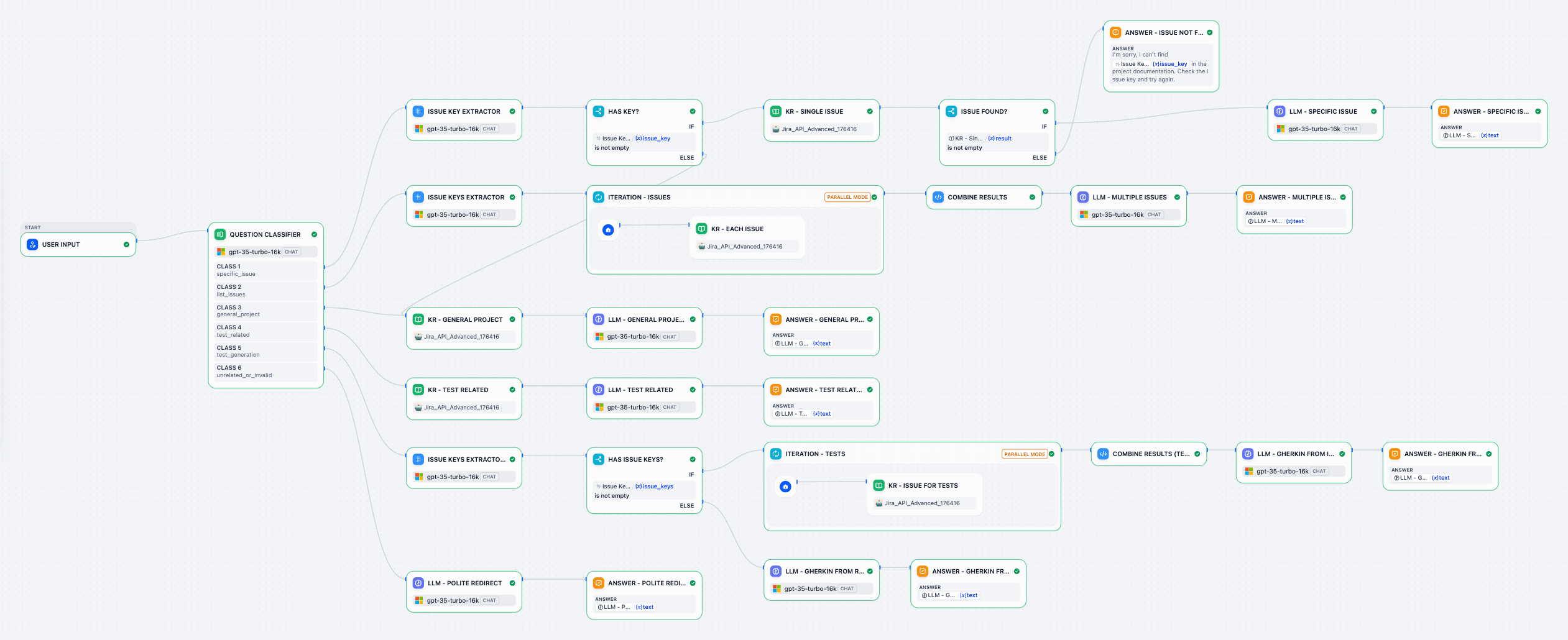
🧩 What You'll Do
Before you start
- You need the
Jira_API_Advanced_*knowledge base from Exercise 2.1. Its documents carry theissue_keymetadata field that the exact-key filters use.Jira_API_Basic_*also works; the manual knowledge base from Exercise 2 does not, because it has no metadata. - Use gpt-35-turbo-16k in every model node, as in Exercise 3.
- Create a new, blank Chatflow (Studio → Create → Create from Blank → Chatflow). Name it, for example,
Exercise 4: Advanced RAG. Keep the User Input node and delete the default LLM and Answer nodes; every branch gets its own.
How to use the copy blocks: hover a block and click the copy icon in its top-right corner, then paste into the Dify field named above the block. When you paste a prompt, Dify turns {{#context#}} into the purple Context block and {{#sys.query#}} into the User Input / query variable, just like in Exercise 3.
Name your nodes as you go. Click a node's title to rename it. This page uses names like KR - Single Issue (KR = Knowledge Retrieval). Using the same names makes the variable pickers much easier to read, because every variable is shown as Node name / variable.
🛠️ Step 1: Route Questions with a Question Classifier
A Question Classifier asks the LLM to put the user's question into one of the classes you define. Each class gets its own output handle, so each type of question can follow its own path.
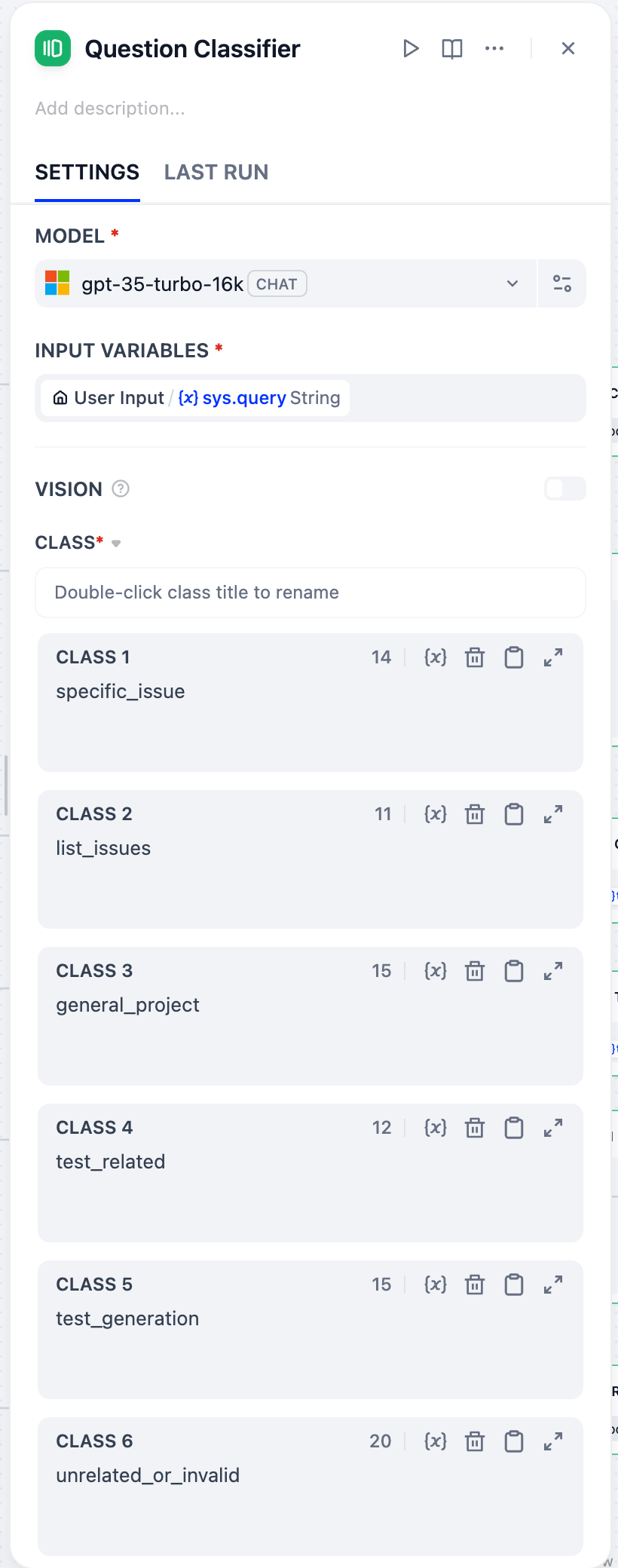
- Hover the right edge of User Input, click +, and add a Question Classifier. Its input variable is already
sys.query. - Select gpt-35-turbo-16k. Click the settings icon next to the model and set Temperature to
0. Routing should be predictable, not creative. - Add classes until there are six, and type one name into each class's text box, in this order:
| Class | Name | Example question |
|---|---|---|
| 1 | specific_issue | What is REST-266 about? |
| 2 | list_issues | Summarize REST-266 and REST-265 |
| 3 | general_project | What is this project about? |
| 4 | test_related | What should we test for backward compatibility? |
| 5 | test_generation | Generate test cases for REST-266 |
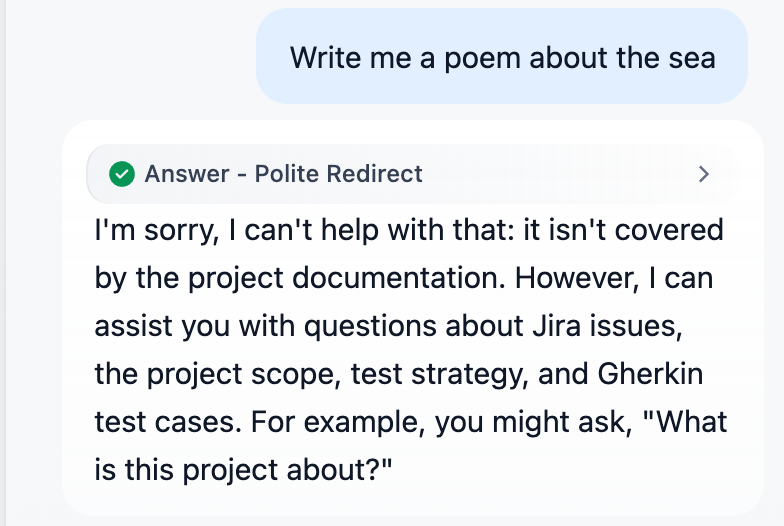
| 6 | unrelated_or_invalid | Write me a poem about the sea |
- Class names alone are ambiguous. For example, is "Generate tests for REST-266" about a specific issue, or is it test generation? Open Advanced Setting at the bottom of the panel and paste this into Instruction:
Question Classifier → Advanced Setting → Instruction
You classify questions sent to a software testing assistant for the Atlassian REST Jira project.
Choose exactly ONE category:

- specific_issue: asks about one Jira issue that it names by key or number. Examples: "What does REST-266 fix?", "Who is assigned to issue 259?"
- list_issues: mentions two or more Jira issue keys and asks to summarize, compare or relate them. Example: "Summarize REST-266 and REST-265"
- general_project: asks about the project as a whole (scope, modules, features, contributors), about a group of issues, or which issue matches a description, without naming a key. Examples: "What is this project about?", "Which issues relate to Jackson?", "Which issue reports that CORS preflight requests are not supported?"
- test_related: asks about test strategy, risk, regression or coverage, without asking to write test cases. Example: "What should we test for backward compatibility?"
- test_generation: asks to write, generate or create test cases or Gherkin scenarios, with or without issue keys. Examples: "Generate test cases for REST-266", "Create test scenarios for a password reset feature"
- unrelated_or_invalid: not about this project, its Jira issues, its documentation or testing. Examples: "Write me a poem", "Why is the sky blue?"

If the user asks to write or generate tests, choose test_generation even when the question contains issue keys.
🛠️ Step 2: Branch specific_issue: Exact-Key Retrieval
In Exercise 3, a question about REST-266 searched the whole knowledge base by meaning. Similar issues could outrank REST-266, and a key that doesn't exist still returned something. This branch pulls the key out of the question and retrieves only the document whose issue_key metadata matches.
specific_issue → Issue Key Extractor → Has Key?
IF → KR - Single Issue → Issue Found?
IF → LLM - Specific Issue → Answer - Specific Issue
ELSE → Answer - Issue Not Found
ELSE → KR - General Project (the Step 4 branch)
2.1 Parameter Extractor: Issue Key Extractor
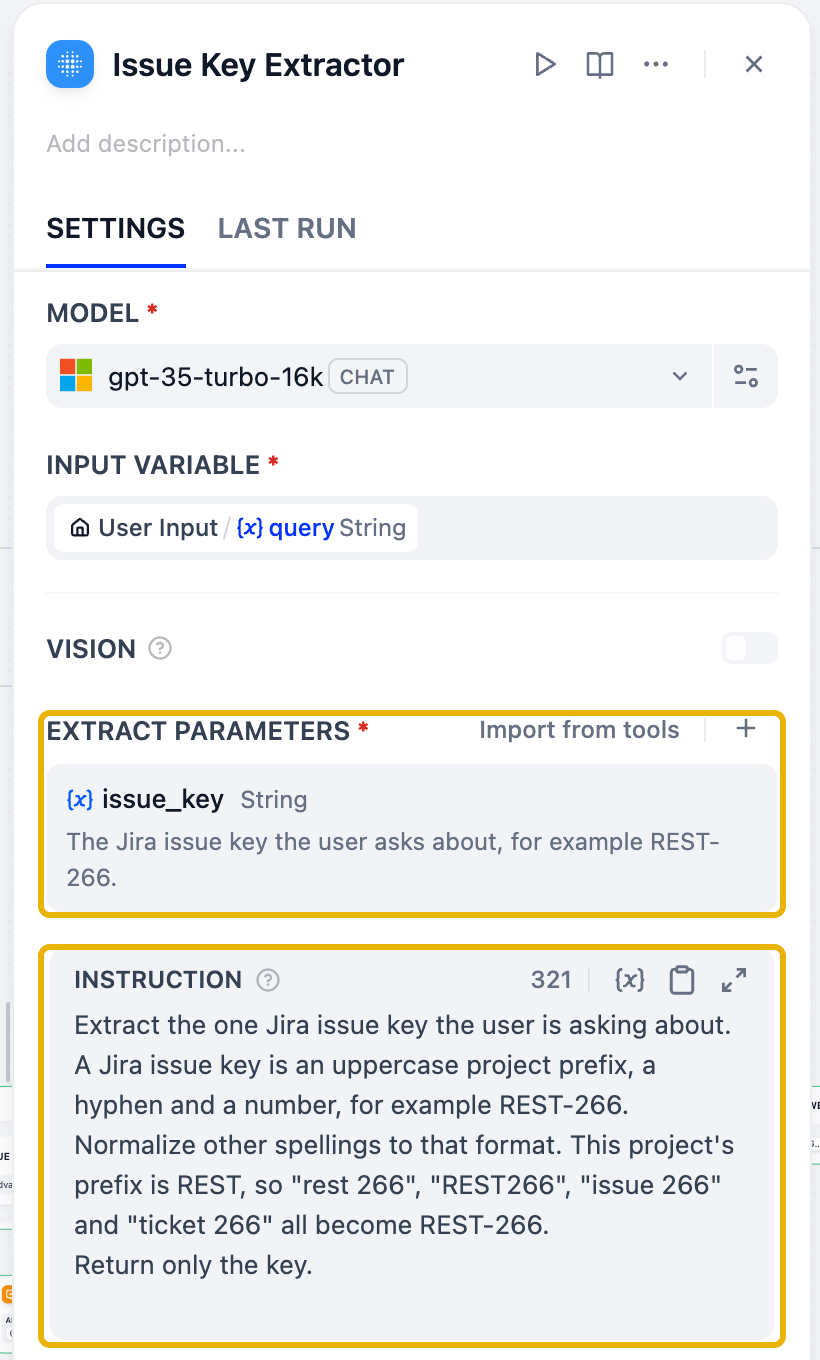
- From the classifier's
specific_issuehandle, add a Parameter Extractor and rename it Issue Key Extractor. Select gpt-35-turbo-16k with Temperature0. The input variable isUser Input / query. - Under Extract Parameters, click + and add:
- Name:
issue_key - Type: String
- Required: off. Some questions look like single-issue questions but name no key; the next step handles them
- Description:
The Jira issue key the user asks about, for example REST-266.
- Name:
- Paste this into Instruction. The normalization line lets "issue 266" or "rest266" find REST-266:
Issue Key Extractor → Instruction
Extract the one Jira issue key the user is asking about.
A Jira issue key is an uppercase project prefix, a hyphen and a number, for example REST-266.
Normalize other spellings to that format. This project's prefix is REST, so "rest 266", "REST266", "issue 266" and "ticket 266" all become REST-266.
Return only the key.
2.1b Cheaper alternative: extract the key with code
Your LLM extractor works. But look at what it does: it finds a pattern like REST-266 in a sentence. Every question pays for an LLM call to do that, and a few lines of Python can do the same job. Here are the two measured side by side on the same questions:
| Extractor | Tokens per question | Time | "What is REST-266 about?" | "What does issue 266 fix?" |
|---|---|---|---|---|
| Parameter Extractor (LLM) | ~550 | 1.0-1.7 s | REST-266 | REST-266 |
| Code node (Python) | 0 | ~0.1 s | REST-266 | REST-266 |
Rule of thumb: if you can describe the answer as a pattern, use code. It's free, instant, and gives the same output every time. Keep the LLM for things only language understanding can do, such as "the ticket about Jackson leniency", where there is no key to match.
To swap the LLM for code:
- Add a Code node between the Question Classifier's
specific_issuehandle and Has Key?, and rename it Extract Keys (Code). Keep Python3. - Replace the default code with:
Extract Keys (Code) → Code (Python3)
import re

# Jira projects in the knowledge base. The first one is used for bare
# numbers such as "issue 266". Add more prefixes if you ingest other projects.
PROJECTS = ["REST"]

# A known prefix, an optional hyphen or space, and a number:
# REST-266, rest 266, REST266
PROJECT_KEY = re.compile(r"\b(" + "|".join(PROJECTS) + r")[\s-]?(\d+)\b", re.IGNORECASE)
# A bare number after a word that means "issue": issue 266, ticket #266
BARE_NUMBER = re.compile(r"\b(?:issue|ticket|bug)\s*#?\s*(\d+)\b", re.IGNORECASE)


def main(query: str) -> dict:
    found = []  # (position in the question, normalized key)
    for match in PROJECT_KEY.finditer(query):
        found.append((match.start(), match.group(1).upper() + "-" + match.group(2)))
    for match in BARE_NUMBER.finditer(query):
        found.append((match.start(), PROJECTS[0] + "-" + match.group(1)))

    issue_keys = []
    for _, key in sorted(found):
        if key not in issue_keys:
            issue_keys.append(key)

    return {
        "issue_key": issue_keys[0] if issue_keys else "",
        "issue_keys": issue_keys,
    }
- Now make the node's variables match the code. Dify passes each input variable to
main()by name, and reads back the returned keys by output variable name, so the names must match exactly:
| In the node | Default | Change it to |
|---|---|---|
| Input Variables | arg1, arg2 | query → User Input / query (delete arg2) |
| Output Variables | result (String) | issue_key (String) and issue_keys (Array[String]); delete result |
![Extract Keys (Code) node: input query from User Input, outputs issue_key String and issue_keys Array[String]](/assets/images/extract-keys-code-fc4c9b471689ae28c20b392a990edf6a.png)
- Rewire the branch, and check each item yourself. Dify's Checklist (the orange badge next to Preview) catches only one of these mistakes:
- Point the condition in Has Key?, the filter condition in KR - Single Issue and the variable in Answer - Issue Not Found at Extract Keys (Code) / issue_key. If you delete Issue Key Extractor first, all three keep pointing at a node that no longer exists. The Checklist flags the Answer node ("Invalid variable"), but not the filter condition. The filter then silently matches nothing.
- Delete Issue Key Extractor.
- The classifier's
specific_issuehandle connects only to Extract Keys (Code), andlist_issuesstill connects to Issue Keys Extractor (plural: the Step 3 node, not the one you just deleted). A class connected to two nodes is valid wiring, so nothing flags it. Dify simply runs both branches.
- Rerun the Step 2 checks. Open the node's Last Run tab to see exactly what it extracted.
Something wrong after the swap? Expand Workflow Process above the answer and compare it with these symptoms:
- Code node fails with
TypeError: main() got an unexpected keyword argument 'arg1': the input variable is stillarg1. Rename it toquery. - Code node fails with an error about its outputs: the Output Variables don't match the keys the code returns. Use
issue_key(String) andissue_keys(Array[String]). - All nodes are green, but the reply is "I'm sorry, I can't find" followed by a blank where the key should be: KR - Single Issue still filters on the deleted extractor's
issue_key. It returns nothing within a few milliseconds, too fast to have searched, so Issue Found? takes ELSE. Re-point the filter condition to Extract Keys (Code) / issue_key. - Nodes from another branch run too, for example Issue Keys Extractor, Iteration - Issues and LLM - Multiple Issues on a single-issue question: one class handle connects to two branches, and Dify runs both. The answers can contradict each other. A "not found" reply can even appear with a REST-266 citation, because the other branch found it. Move the extra connection to the right class handle.
Notice what the code does not do, and why:
PROJECTSlists the prefixes that count as Jira keys. Without that list, a question aboutUTF-8would be read as issue number 8 in project UTF. Code only knows the patterns you give it, so pin them down.- It doesn't guess. Anything that doesn't match returns an empty
issue_key, and Has Key? sends the question to semantic search instead of a filter that can't match. - The node also returns
issue_keys, a list of every key in the question, so it can replace the Issue Keys Extractor in Steps 3 and 5 as well. A question without keys gives an empty list, and the Has Issue Keys? check in Step 5 works unchanged.
Try it: ask Who is assigned to rest266?, Status of ticket #259 and Does UTF-8 break JSON parsing?, and compare the Last Run output of the code node with the LLM extractor's. For the best of both, run the code first and fall back to the LLM extractor only when the code finds nothing. You'll need an IF/ELSE and a Variable Aggregator to merge the two paths. The downloadable solution uses the LLM extractor, so you can compare the two.
2.2 IF/ELSE: Has Key?
Not every question routed here contains a key. "Which issue reports that CORS preflight requests are not supported?" asks about one issue, but describes it instead of naming it. The extractor then returns an empty issue_key. The exact-key filter can't match an empty key, so without this step the chatbot would answer "I can't find" for an issue that exists.
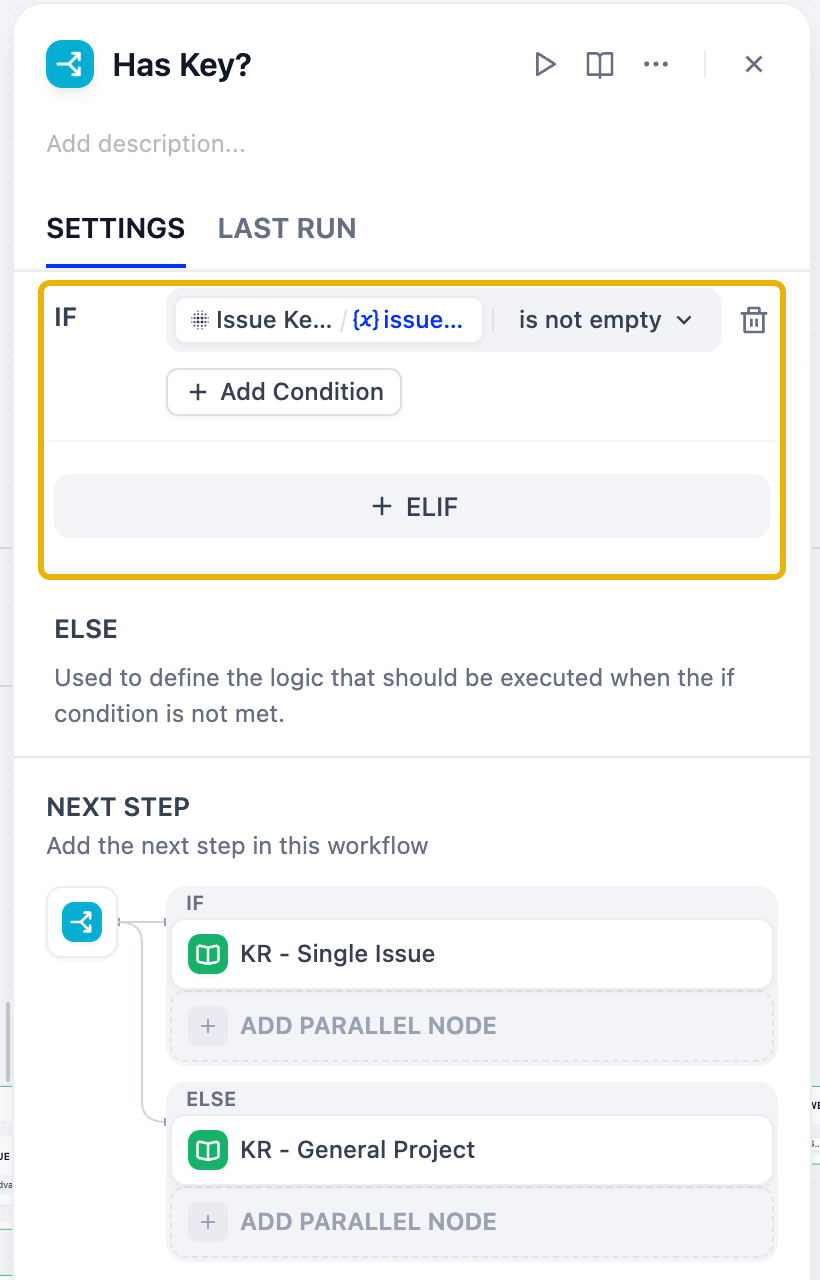
- After the extractor, add an IF/ELSE node named Has Key?.
- IF: Issue Key Extractor / issue_key is not empty. The IF branch continues to the exact-key retrieval in 2.3.
- ELSE: connect it to KR - General Project, the semantic-search retriever you build in Step 4. A node can receive connections from several branches. If you haven't built Step 4 yet, come back and connect it then.
2.3 Knowledge Retrieval with a metadata filter: KR - Single Issue
- From the IF handle of Has Key?, add a Knowledge Retrieval node and rename it KR - Single Issue. Keep Query Text as
sys.query. - Click + next to Knowledge and add
Jira_API_Advanced_*. - Set Metadata Filtering to Manual and click Conditions → Add Condition:
- Field:
issue_key - Operator: is
- Value: switch to Variable and pick Issue Key Extractor / issue_key
- Field:
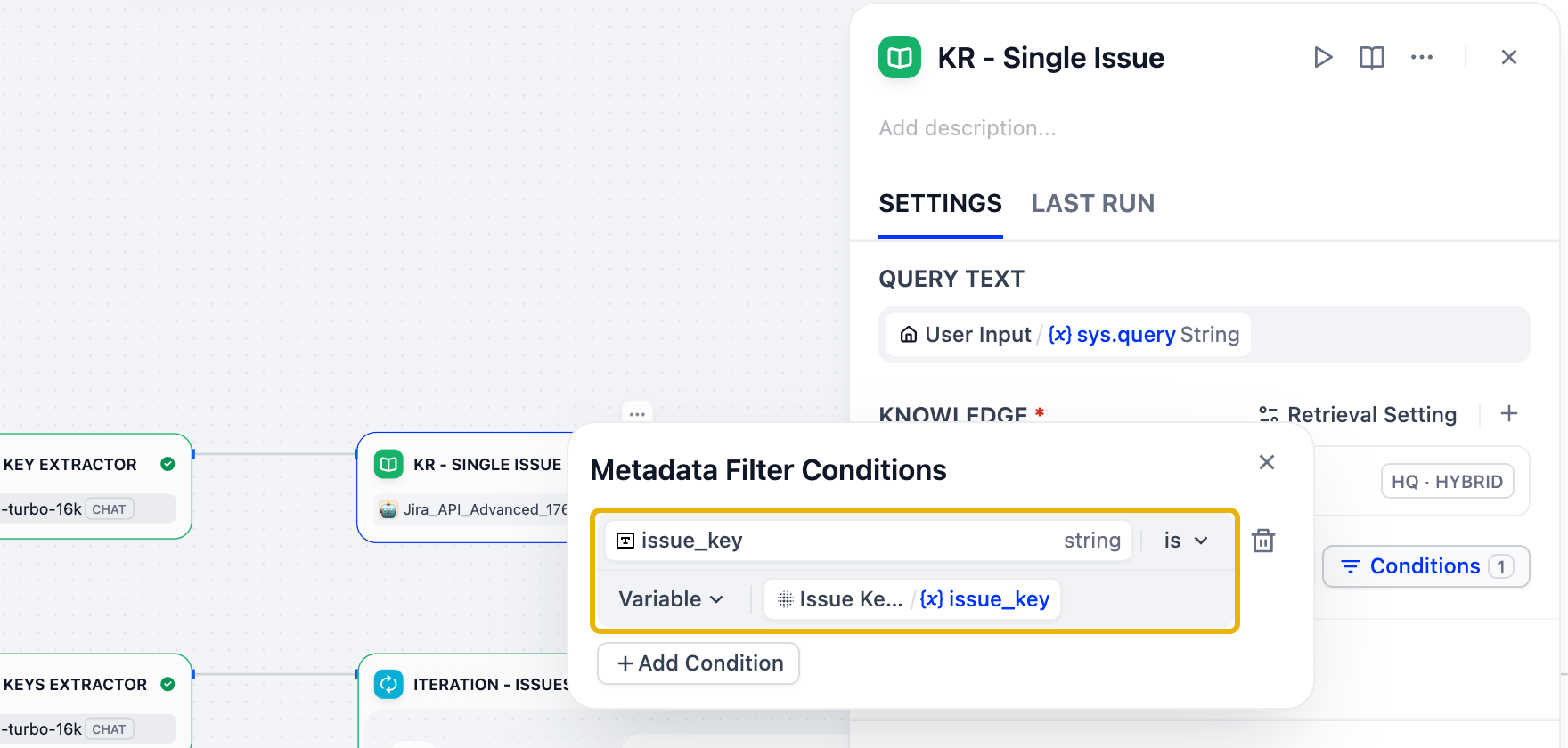
- Open Retrieval Setting. Set Top K to
4and leave Score Threshold off.
Why no score threshold here? The filter already guarantees that only REST-266 can come back. A threshold would only drop it: with the question "What is REST-266 about?", REST-266 scores 0.27 in Jira_API_Basic_*. A 0.3 threshold removes it, and the chatbot then answers "can't find that issue" for an issue that exists. Use thresholds on open-ended searches (Exercise 3), not on exact-key lookups.
2.4 IF/ELSE: Issue Found?
If the key doesn't exist, the filtered retriever returns nothing. You might expect the LLM to say so. In testing, though, gpt-35-turbo-16k answered What is REST-999 about? with an invented issue, complete with status and assignee, even though the prompt said to refuse when the context is empty. Don't leave this decision to the model; make it with a rule.
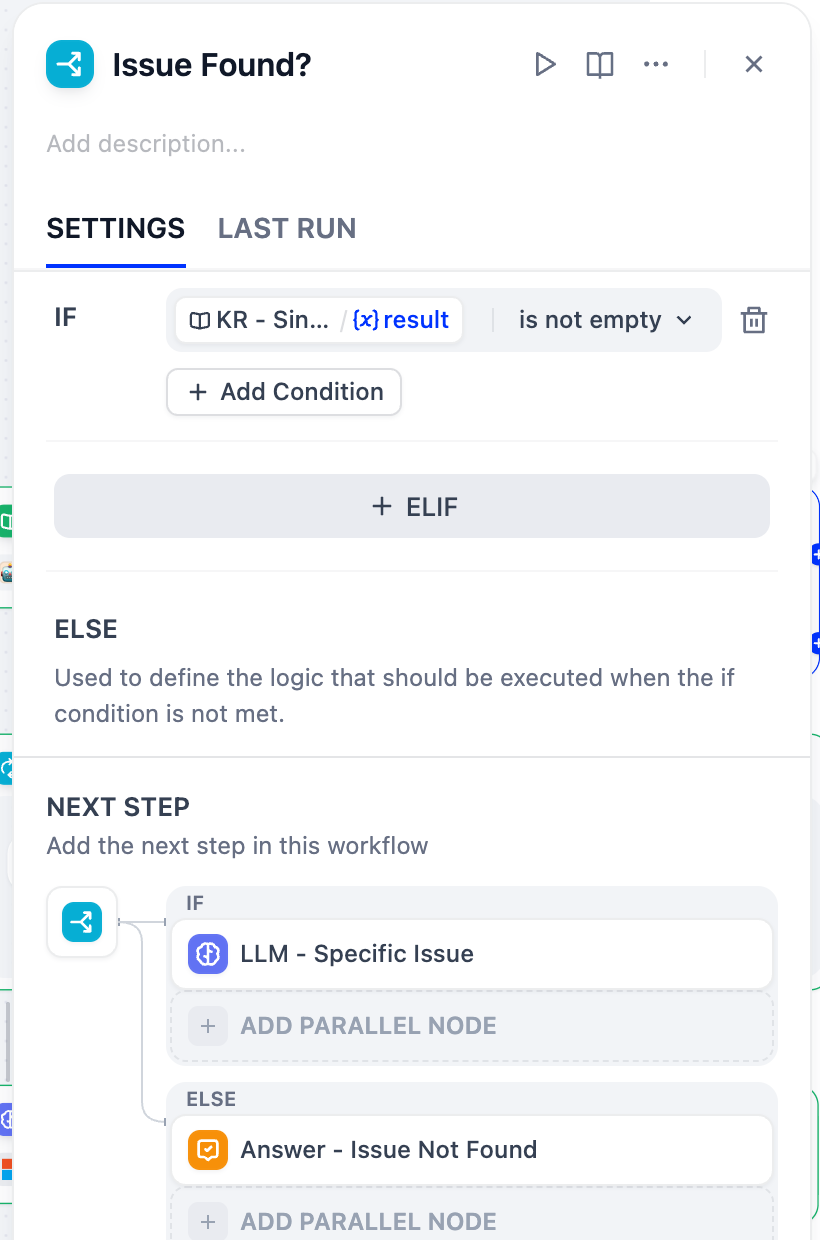
- After KR - Single Issue, add an IF/ELSE node named Issue Found?.
- IF: KR - Single Issue / result is not empty. The IF branch continues to the LLM in 2.5.
- ELSE: add an Answer node named Answer - Issue Not Found. Paste the text below, then replace
[issue_key]with the variable Issue Key Extractor / issue_key (type{to pick it):
Answer - Issue Not Found → Answer
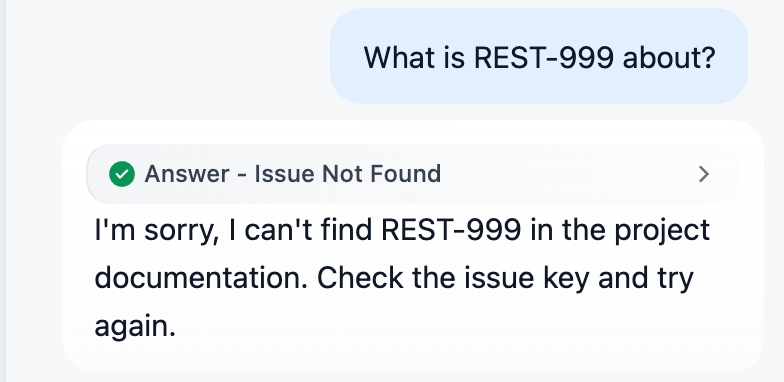
I'm sorry, I can't find [issue_key] in the project documentation. Check the issue key and try again.
2.5 LLM and Answer
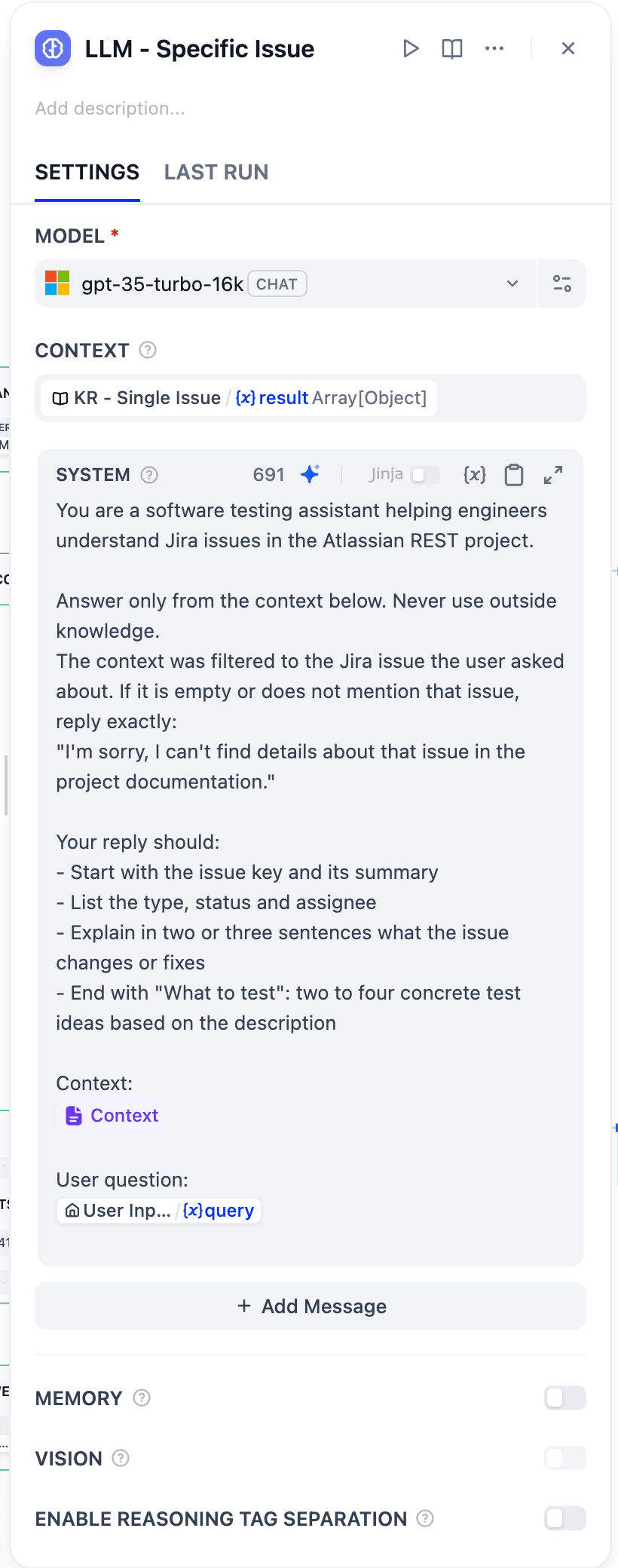
- From the IF handle of Issue Found?, add an LLM node, rename it LLM - Specific Issue, select gpt-35-turbo-16k, and set Temperature to
0.3. - Under Context, click Set variable and choose KR - Single Issue / result.
- Paste this into the SYSTEM prompt:
LLM - Specific Issue → SYSTEM
You are a software testing assistant helping engineers understand Jira issues in the Atlassian REST project.

Answer only from the context below. Never use outside knowledge.
The context was filtered to the Jira issue the user asked about. If it is empty or does not mention that issue, reply exactly:
"I'm sorry, I can't find details about that issue in the project documentation."

Your reply should:
- Start with the issue key and its summary
- List the type, status and assignee
- Explain in two or three sentences what the issue changes or fixes
- End with "What to test": two to four concrete test ideas based on the description

Context:
{{#context#}}

User question:
{{#sys.query#}}
- Add an Answer node, rename it Answer - Specific Issue, and set its content to LLM - Specific Issue / text (type
{or use the {x} button).
✅ Check it
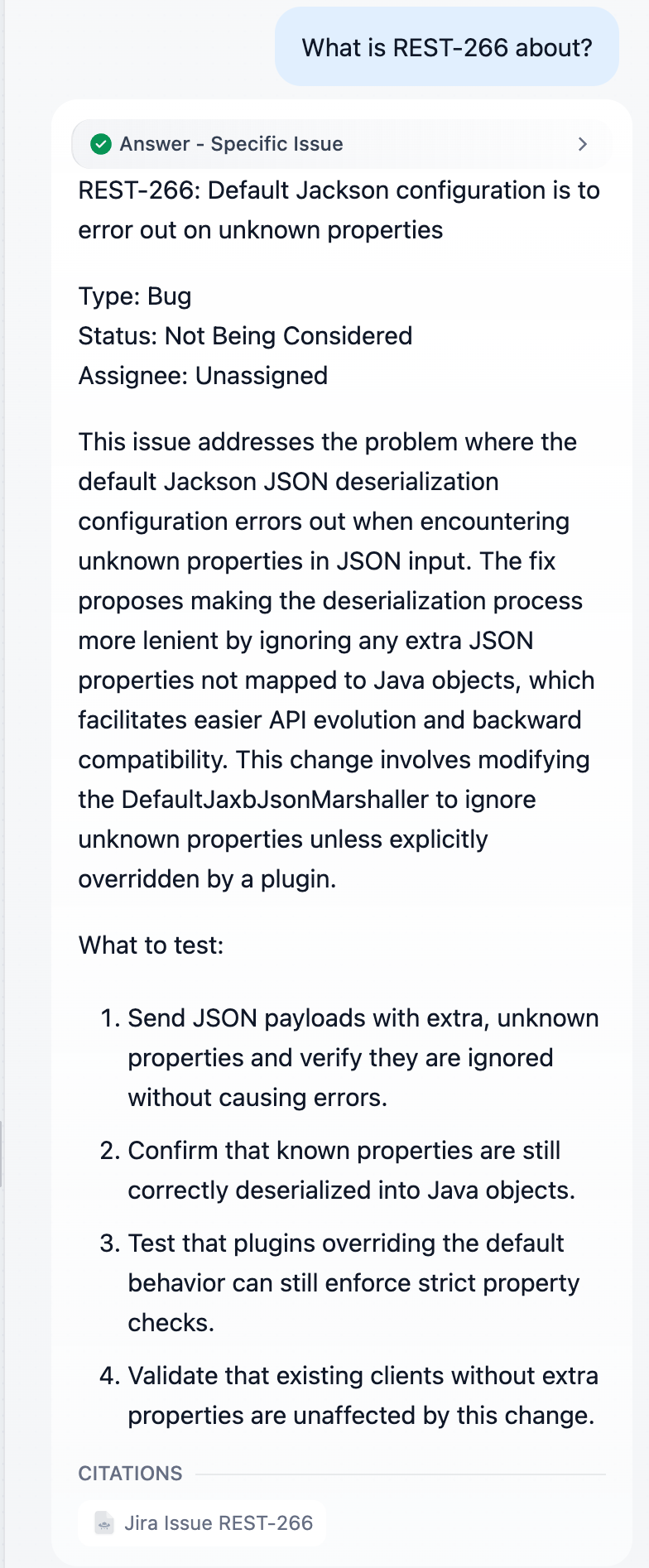
Click Preview and ask What is REST-266 about?. The label above the answer shows which Answer node replied: it should be Answer - Specific Issue, with a single citation to REST-266. Also try What does issue 266 fix?, which should find REST-266 too.
Then ask What is REST-999 about?. No document has that key, so the reply must come from Answer - Issue Not Found:
🛠️ Step 3: Branch list_issues: One Retrieval per Issue
One search for "REST-266 and REST-265" returns whichever chunks score best, often mostly one issue. This branch extracts every key and runs one filtered retrieval per key with an Iteration. A Code node then combines the results and reports any keys that weren't found.
list_issues → Issue Keys Extractor → Iteration - Issues [ KR - Each Issue ] → Combine Results → LLM - Multiple Issues → Answer - Multiple Issues
3.1 Parameter Extractor: Issue Keys Extractor
From the list_issues handle, add a Parameter Extractor named Issue Keys Extractor (gpt-35-turbo-16k, Temperature 0) with one parameter:
- Name:
issue_keys(plural; the Iteration reads this exact name) - Type: Array[String]
- Required: on
- Description:
Every Jira issue key in the question, for example ["REST-266", "REST-265"].
Issue Keys Extractor → Instruction
Extract every Jira issue key mentioned in the user's question, in the order they appear.
A Jira issue key is an uppercase project prefix, a hyphen and a number, for example REST-266.
Normalize other spellings to that format. This project's prefix is REST, so "rest 266", "REST266", "issue 266" and "ticket 266" all become REST-266.
If the question contains no issue key, return an empty list.
3.2 Iteration: Iteration - Issues
- After the extractor, add an Iteration node named Iteration - Issues.
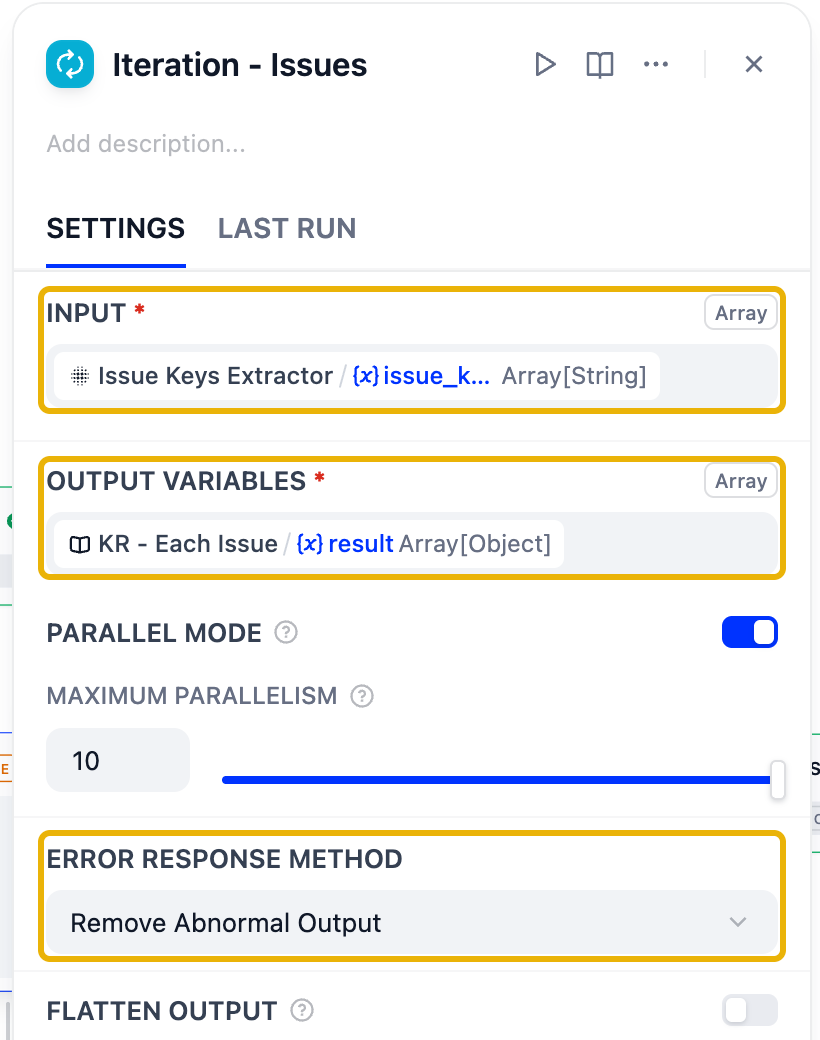
- Input: Issue Keys Extractor / issue_keys. The Iteration runs its inner nodes once per key, and the current key is available as
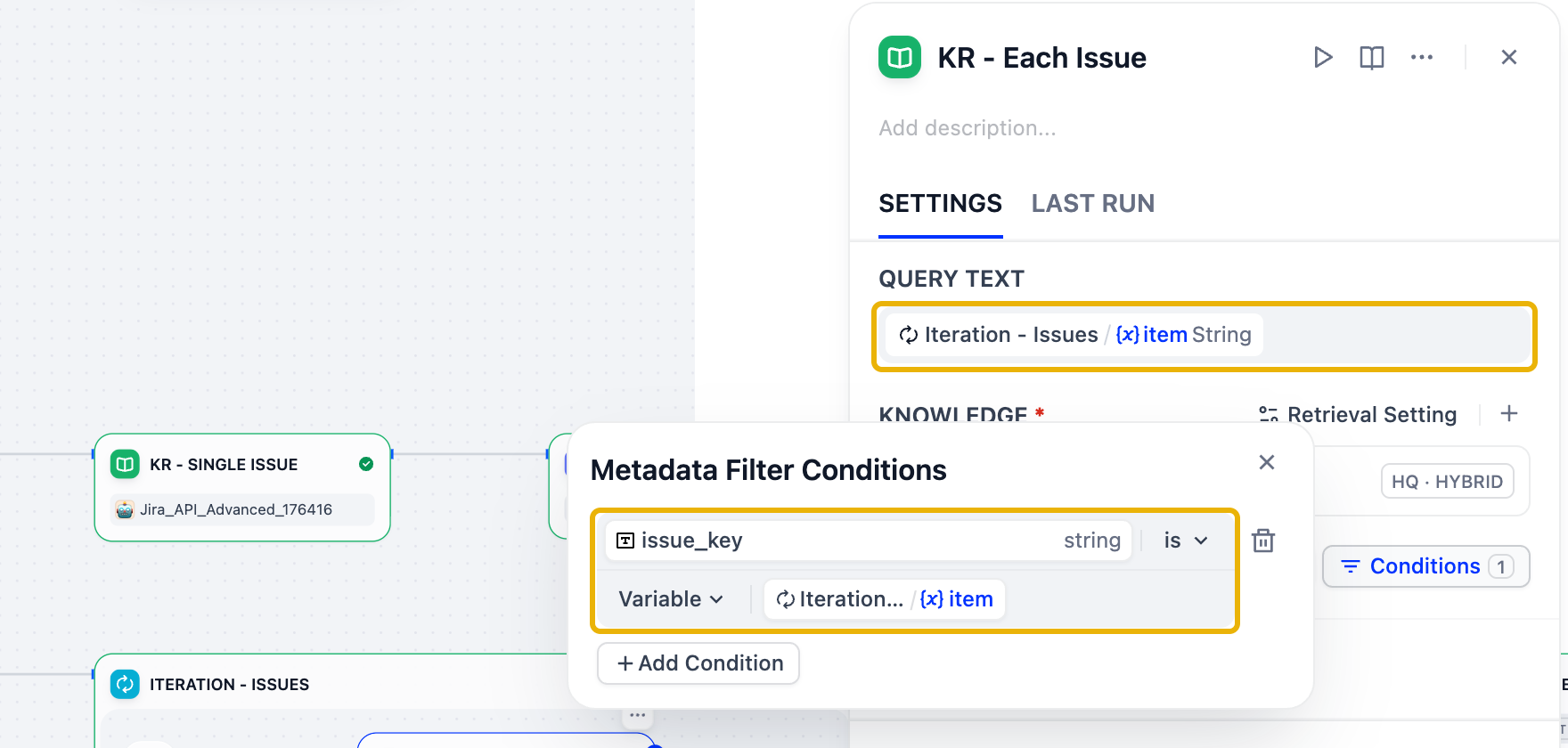
item. - Inside the Iteration box, click + after the start icon and add a Knowledge Retrieval named KR - Each Issue:
- Query Text: Iteration - Issues / item (not
sys.query, which contains every key) - Knowledge:
Jira_API_Advanced_* - Metadata Filtering: Manual,
issue_keyis Variable Iteration - Issues / item - Retrieval Setting: Top K
4, Score Threshold off
- Query Text: Iteration - Issues / item (not
- Back on the Iteration node, set:
- Output Variables: KR - Each Issue / result
- Parallel Mode: on (optional; issues are retrieved at the same time)
- Error Response Method: Remove Abnormal Output, so one failing key doesn't fail the whole run
- Flatten Output: off
3.3 Code: Combine Results
The Iteration returns a list of results, one per key. A key that doesn't exist, such as REST-999, just produces an empty result, and nothing tells the LLM that it's missing. This Code node flattens the results into one context list and compares the requested keys with the keys actually found.
- After the Iteration, add a Code node named Combine Results. Keep Python3.
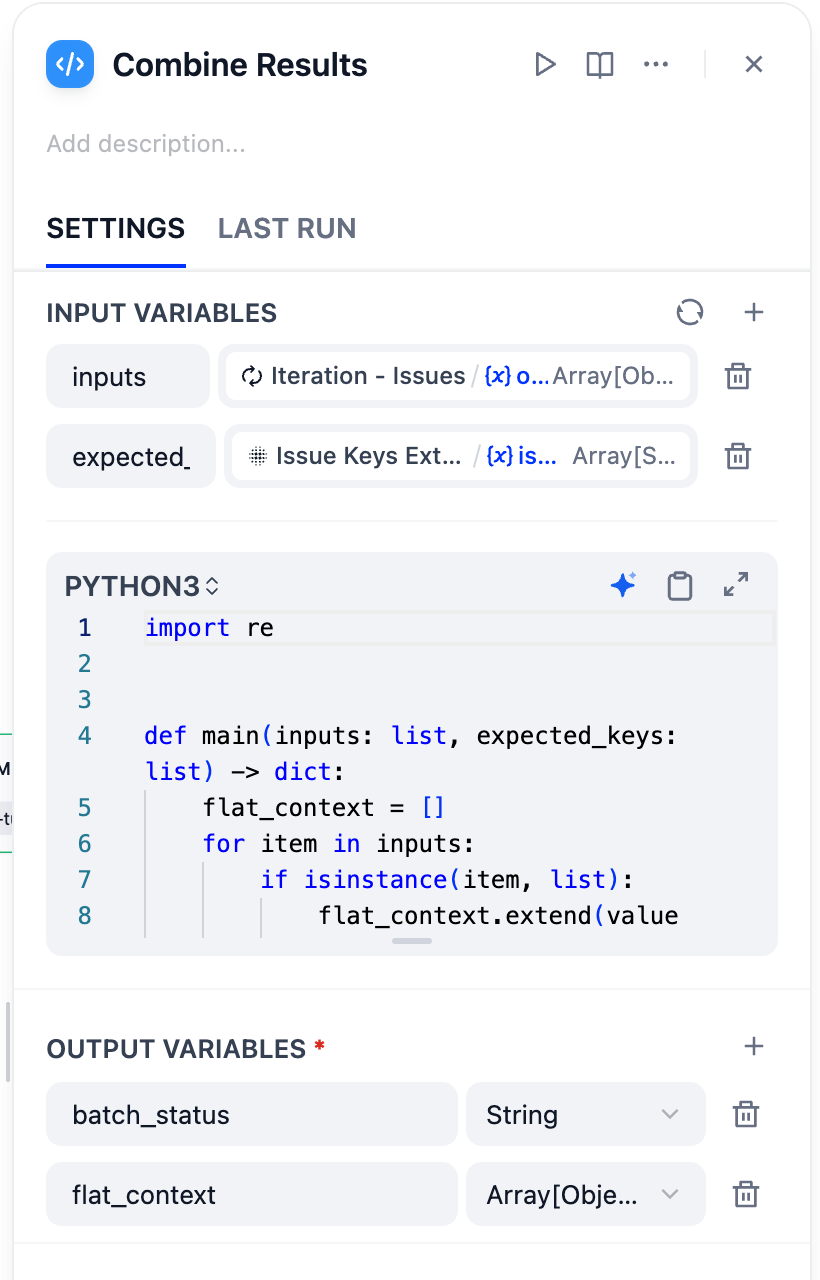
- Input Variables: the names must match the arguments of
main()in the code below:- rename
arg1toinputsand pick Iteration - Issues / output - rename
arg2toexpected_keysand pick Issue Keys Extractor / issue_keys
- rename
- Replace the code with:
Combine Results → Code (Python3)
import re


def main(inputs: list, expected_keys: list) -> dict:
    flat_context = []
    for item in inputs:
        if isinstance(item, list):
            flat_context.extend(value for value in item if isinstance(value, dict))
        elif isinstance(item, dict):
            flat_context.append(item)

    expected = [str(key).upper() for key in expected_keys if key]
    retrieved_keys = set(re.findall(
        r"(?<![A-Z0-9-])[A-Z][A-Z0-9]+-\d+(?![A-Z0-9-])",
        str(flat_context).upper(),
    ))
    completed = [key for key in expected if key in retrieved_keys]
    missing = [key for key in expected if key not in retrieved_keys]

    if not expected:
        batch_status = "No Jira issue keys were requested."
    elif not completed:
        batch_status = "No requested Jira issues were retrieved: " + ", ".join(expected) + "."
    elif missing:
        batch_status = "Partial result: retrieved " + str(len(completed)) + " of " + str(len(expected)) + " requested issues. Missing: " + ", ".join(missing) + "."
    else:
        batch_status = "Complete result: retrieved all " + str(len(expected)) + " requested issues."

    return {"flat_context": flat_context, "batch_status": batch_status}
- Output Variables: delete the default
resultand addflat_contextas Array[Object] andbatch_statusas String, the two keys the code returns.
3.4 LLM and Answer
- Add an LLM named LLM - Multiple Issues (Temperature
0.3) with Context set to Combine Results / flat_context. - Paste the prompt into SYSTEM. Then select the placeholder
[batch_status], delete it, type{and pick Combine Results / batch_status.
LLM - Multiple Issues → SYSTEM
You are a software testing assistant helping engineers understand Jira issues in the Atlassian REST project.

Answer only from the context below. Never use outside knowledge.
The context holds the Jira issues retrieved for the keys the user asked about.

Batch status: [batch_status]
If the batch status starts with "Partial result" or "No requested Jira issues", begin your reply with that status and name the missing keys. Never describe an issue that is not in the context.

For each issue found, in the order the user asked:
- A heading with the issue key and summary
- Type, status and assignee
- One or two sentences on what it changes
- What to test: two or three concrete ideas

If the issues share a component, risk or theme, finish with a short "How they relate" section.

Context:
{{#context#}}

User question:
{{#sys.query#}}
- Add Answer - Multiple Issues showing LLM - Multiple Issues / text.
✅ Check it
Ask Summarize REST-266 and REST-265. You should get one section per issue and citations for both. Then ask Summarize REST-266 and REST-999. The answer must start with the partial status and must not invent REST-999:
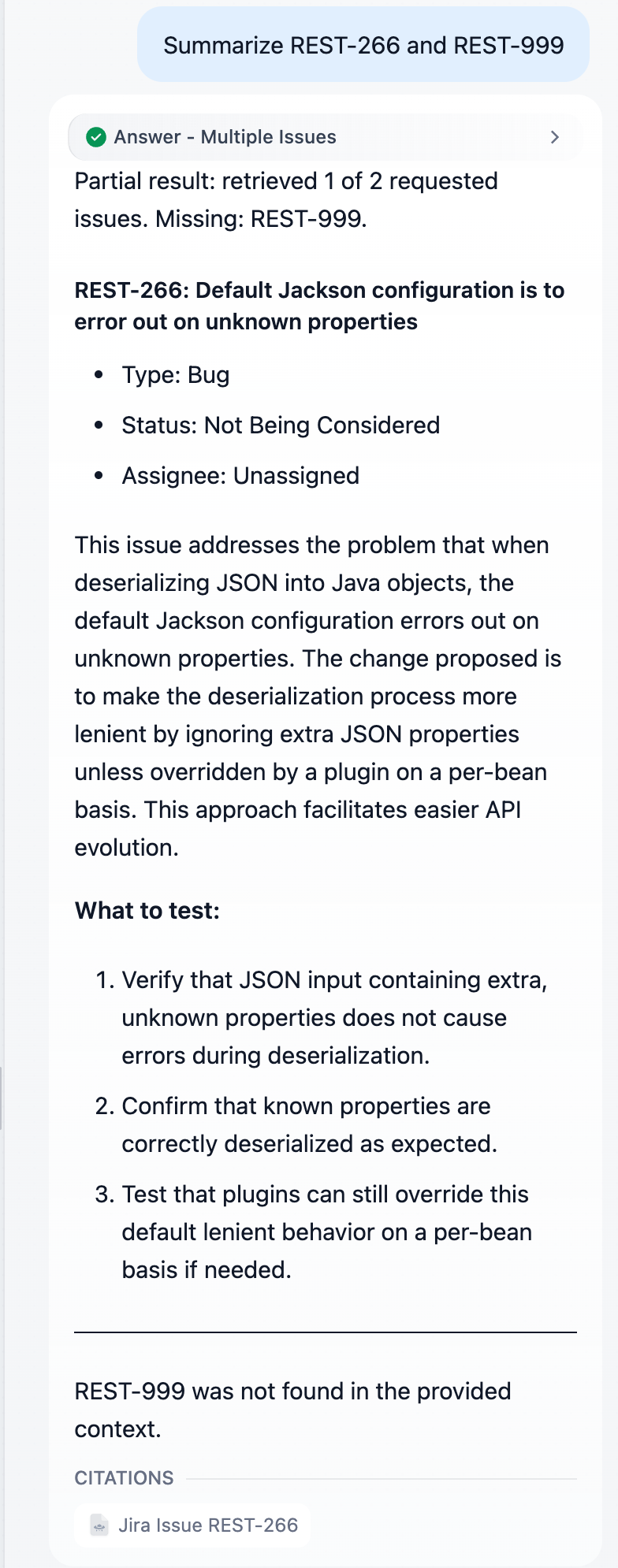
🛠️ Step 4: Branches general_project and test_related
These two branches don't name a key, so they use a normal semantic search, as in Exercise 3. They differ in their prompts: a project overview needs a summary across issues, while a test-strategy question needs risks and recommendations.
general_project → KR - General Project → LLM - General Project → Answer - General Project
test_related → KR - Test Related → LLM - Test Related → Answer - Test Related
For each branch:
- Add a Knowledge Retrieval (KR - General Project or KR - Test Related): Query Text
sys.query, knowledgeJira_API_Advanced_*, Metadata Filtering Disabled, Top K4. - Add an LLM (Temperature
0.3) and set Context to that branch's retriever result. - Paste the matching prompt, then add the Answer node.
Don't forget the Context. If the Context field is empty, the {{#context#}} block in the prompt stays empty. The LLM then follows its own rule and replies "I can't find relevant information" to every question, even though the retriever found the right issues.
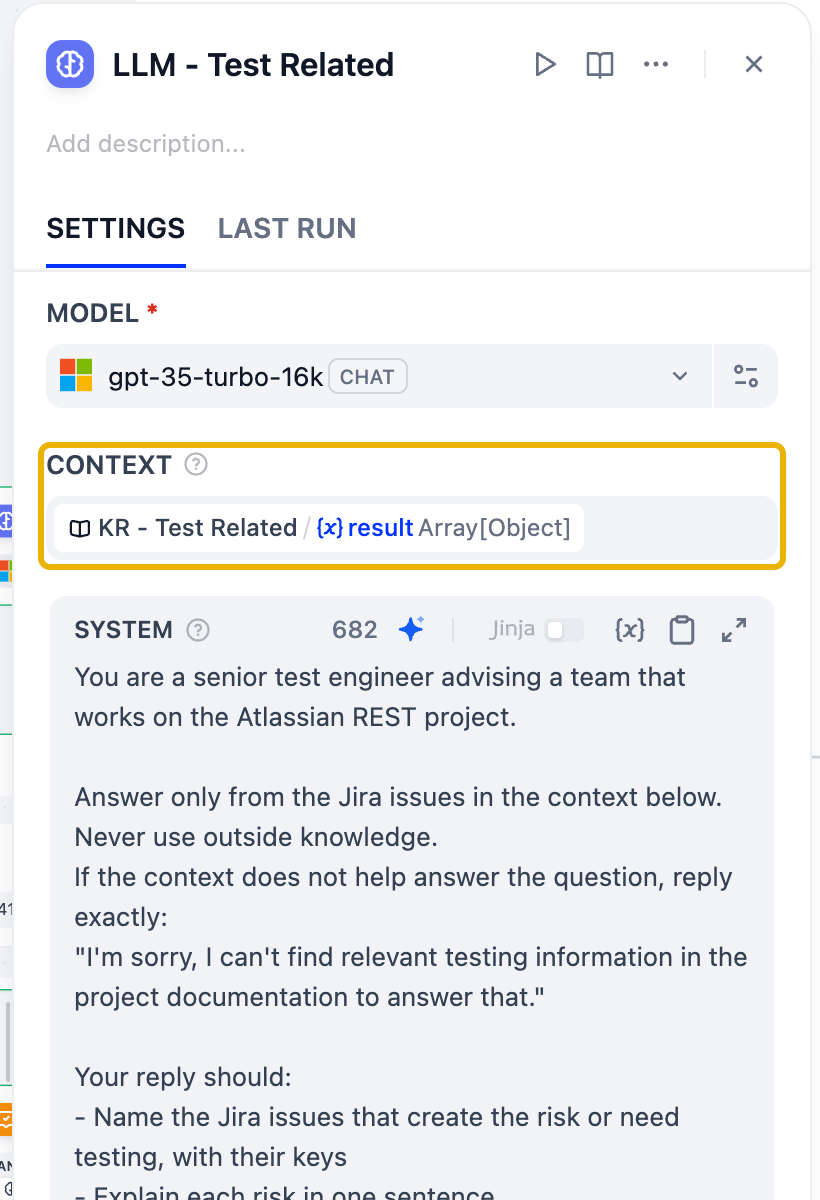
LLM - General Project → SYSTEM
You are a software testing assistant helping engineers understand the Atlassian REST project: its scope, modules, features and open work.

Answer only from the context below. Never use outside knowledge. The context contains several Jira issues; combine them into one answer.
If the context does not help answer the question, reply exactly:
"I'm sorry, I can't find relevant project information in the documentation to answer that."

Your reply should:
- Answer the question directly in the first sentence
- Support it with the Jira issues in the context, citing their keys (for example REST-320)
- Point out what matters for testing when it is relevant

Context:
{{#context#}}

User question:
{{#sys.query#}}
LLM - Test Related → SYSTEM
You are a senior test engineer advising a team that works on the Atlassian REST project.

Answer only from the Jira issues in the context below. Never use outside knowledge.
If the context does not help answer the question, reply exactly:
"I'm sorry, I can't find relevant testing information in the project documentation to answer that."

Your reply should:
- Name the Jira issues that create the risk or need testing, with their keys
- Explain each risk in one sentence
- Recommend what to test: the test level (unit, integration, regression, security) and concrete checks
- Order the recommendations by risk, highest first

Context:
{{#context#}}

User question:
{{#sys.query#}}
✅ Check it
Ask What is this project about? (Answer - General Project) and What should we test for backward compatibility? (Answer - Test Related). The test answer should name REST-266 and rank its recommendations by risk:

🛠️ Step 5: Branch test_generation: With or Without Issue Keys
Users ask for tests in two ways: "Generate test cases for REST-266" (ground them in the issue) and "Create test scenarios for a password reset feature" (no issue, just a requirement). An IF/ELSE node picks the path.
test_generation → Issue Keys Extractor (Tests) → Has Issue Keys?
IF → Iteration - Tests [ KR - Issue for Tests ] → Combine Results (Tests) → LLM - Gherkin from Issues → Answer
ELSE → LLM - Gherkin from Requirement → Answer
- Issue Keys Extractor (Tests): same parameter and instruction as in Step 3.1, but turn Required off. A requirement without keys should return an empty list, not fail.
- IF/ELSE named Has Issue Keys?: IF Issue Keys Extractor (Tests) / issue_keys is not empty. Leave ELSE as the other path.
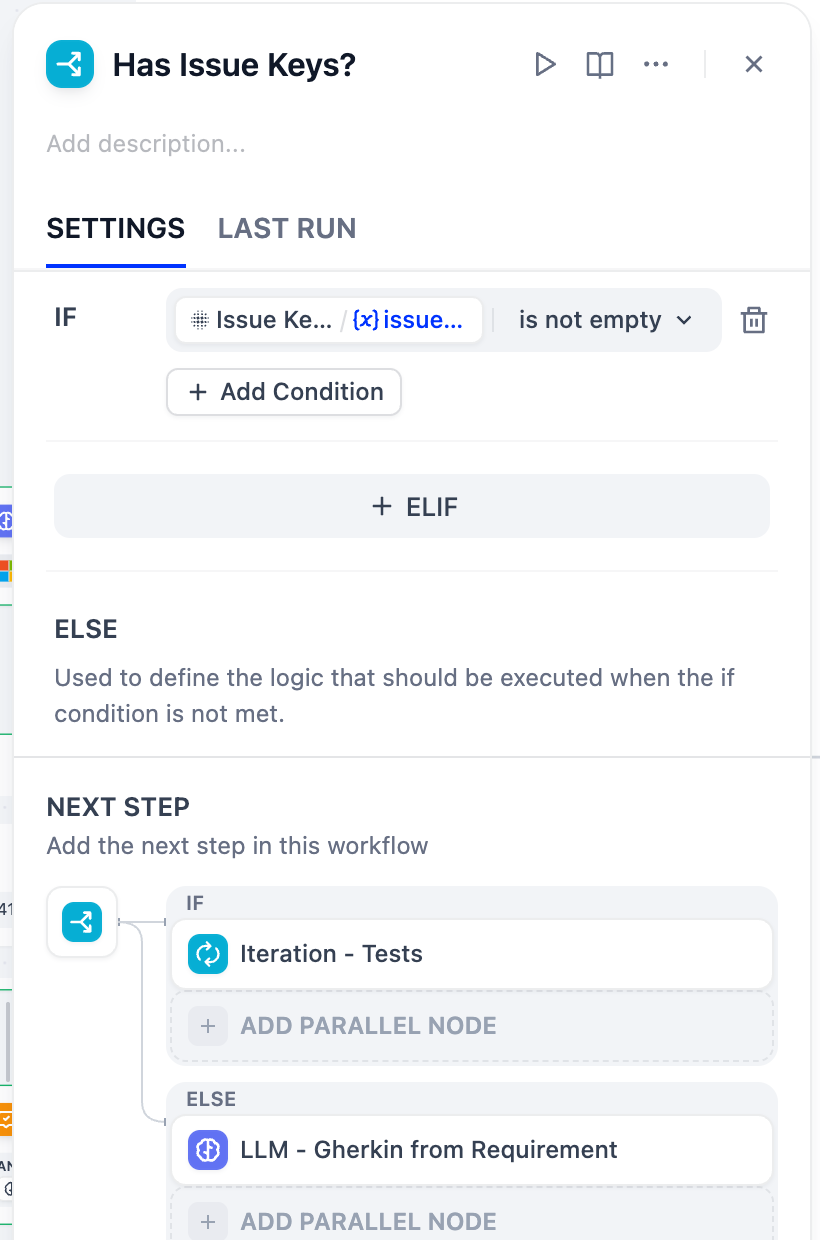
- IF path: rebuild the Step 3 pattern. You can select Iteration - Issues and Combine Results, copy them (Ctrl/Cmd+C) and paste them (Ctrl/Cmd+V), then re-point every variable at the test branch: the Iteration input, the inner retriever's query and filter, and both Code inputs. Rename the copies Iteration - Tests, KR - Issue for Tests and Combine Results (Tests). Then add LLM - Gherkin from Issues with Context set to Combine Results (Tests) / flat_context, and replace
[batch_status]as in Step 3.4:
LLM - Gherkin from Issues → SYSTEM
You are an experienced test designer. Write Gherkin test scenarios for the Jira issues in the context below.

Use only the behaviour described in the context. Do not invent endpoints, fields or error messages.

Batch status: [batch_status]
If the batch status starts with "Partial result" or "No requested Jira issues", begin your reply with that status and name the missing keys. Only write scenarios for issues that are in the context.

For each issue:
- A heading "### <issue key>: <summary>"
- One gherkin code block with a Feature and two or three Scenarios: the main behaviour, an edge case, and a regression check when relevant
- Concrete, testable Given/When/Then steps

Context:
{{#context#}}

User request:
{{#sys.query#}}
- ELSE path: add LLM - Gherkin from Requirement with no Context. There is nothing to retrieve; the requirement is in the question itself.
LLM - Gherkin from Requirement → SYSTEM
You are an experienced test designer. The user describes a requirement in their own words, without a Jira issue key.

Write Gherkin test scenarios for that requirement:
- One gherkin code block with a Feature and three to five Scenarios
- Cover the main flow, invalid input and at least one edge case
- Keep every step concrete and testable; leave out steps that check nothing
- If the requirement is too vague to test, ask one clarifying question instead of guessing

User requirement:
{{#sys.query#}}
- Give each LLM its own Answer node.
✅ Check it
Generate test cases for REST-266 should reply from Answer - Gherkin from Issues with scenarios that match the issue. Create test scenarios for a password reset feature should take the ELSE path.
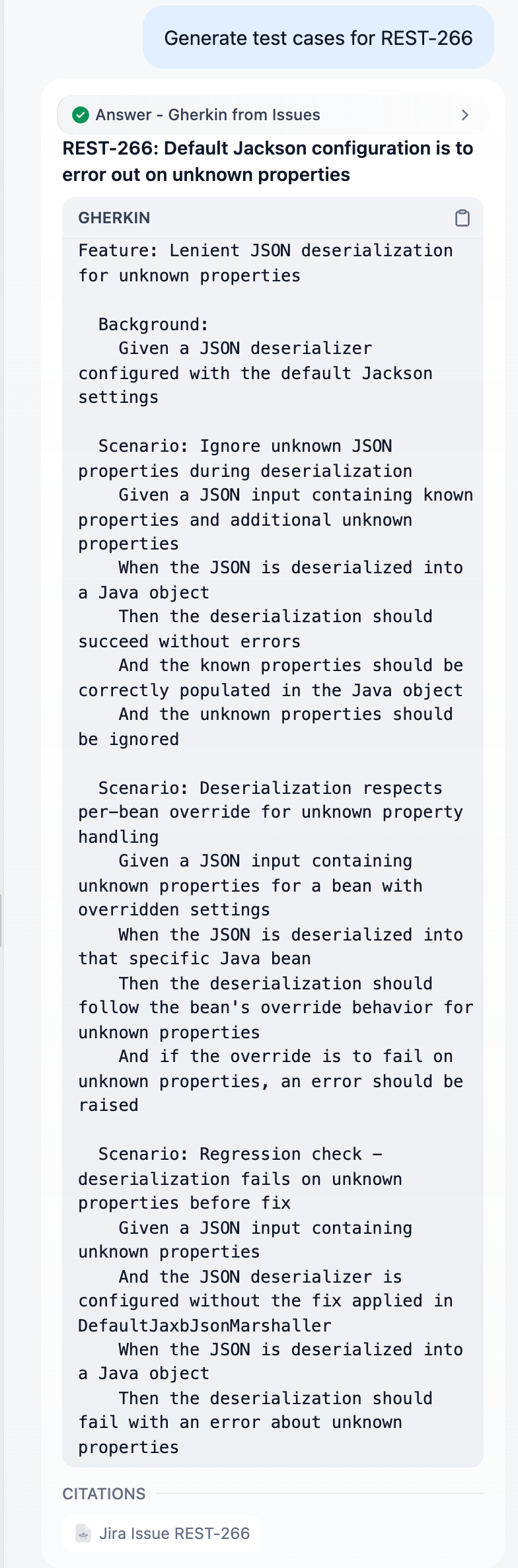
🛠️ Step 6: Branch unrelated_or_invalid: Polite Redirect
From the last class handle, add LLM - Polite Redirect (no Context, no retrieval) and its Answer node. Nothing is retrieved, so the model has nothing to be tempted to misuse. The reply must start with an explicit refusal ("I'm sorry, I can't help with that…"), the same contract as the Exercise 3 chatbot, so that automated tests such as those in Exercise 5 recognise it. Its example question deliberately names no issue key: a refusal shouldn't mention Jira issues.
LLM - Polite Redirect → SYSTEM
You are Testus Patronus, an assistant that only helps with software testing for the Atlassian REST Jira project.

The user's message is outside that scope. Do not answer it, not even partially.
Start your reply with exactly: "I'm sorry, I can't help with that: it isn't covered by the project documentation."
Then add one friendly sentence: say what you can help with (Jira issues, project scope, test strategy and Gherkin test cases) and suggest one example question that doesn't name a specific issue, such as "What is this project about?".

User message:
{{#sys.query#}}
🧪 Step 7: Run the Acceptance Questions
Run each question in Preview, starting a new conversation (the ↻ icon) each time. The label above each answer tells you which branch replied.
| Question | Expected answer node | Passes when |
|---|---|---|
| What is REST-266 about? | Answer - Specific Issue | Describes REST-266, with one REST-266 citation |
| What does issue 266 fix? | Answer - Specific Issue | "issue 266" is normalized to REST-266 |
| What is REST-999 about? | Answer - Issue Not Found | Says REST-999 can't be found; no invented details |
| Summarize REST-266 and REST-265 | Answer - Multiple Issues | One section per issue, citations for both |
| Summarize REST-266 and REST-999 | Answer - Multiple Issues | Starts with "Partial result… Missing: REST-999" |
| What is this project about? | Answer - General Project | Summary backed by cited Jira keys |
| What should we test for backward compatibility? | Answer - Test Related | Names REST-266 and ranks tests by risk |
| Generate test cases for REST-266 | Answer - Gherkin from Issues | Gherkin scenarios that match REST-266 |
| Create test scenarios for a password reset feature | Answer - Gherkin from Requirement | Gherkin scenarios, no Jira citations |
| Which issue reports that CORS preflight requests are not supported? | Answer - General Project | Names REST-366: no key, so Has Key? falls back to semantic search |
| Write me a poem about the sea | Answer - Polite Redirect | Starts with "I'm sorry", names no Jira issue, and suggests a testing question |
Once they all pass, Publish and name the version, as in Exercise 3.
When something doesn't pass
| Symptom | Likely cause | Fix |
|---|---|---|
| A made-up answer for a key that doesn't exist | The LLM runs on an empty context | Add the Issue Found? IF/ELSE from Step 2.4 |
| "I'm sorry, I can't find in the project documentation" (a blank where the key should be) | The question names no key, and there is no fallback | Add the Has Key? IF/ELSE from Step 2.2 |
| "Can't find" for an issue that exists | Score Threshold is on in the filtered retriever, or the filter points at the wrong or a deleted variable | Turn the threshold off. Open the filter's Conditions and check that the value is the current extractor's issue_key (or the Iteration's item) |
| Nodes from two branches run for one question, and the answers are mixed | One class handle connects to two branches | Keep one connection per class handle; move the extra one to the right class |
"issue 266" becomes ISSUE-266 | The extractor instruction lacks the normalization rule | Paste the extractor instruction from this page |
| Every project or testing question gets "can't find relevant information" | The LLM's Context field is empty | Set Context to the branch retriever's result |
| The Iteration runs zero times | The extractor output name doesn't match (issue_key vs issue_keys) | Use issue_keys (Array[String]) and re-select the Iteration input |
| A multi-issue answer only describes one issue, or mixes them up | The inner retriever searches with sys.query | Use Iteration / item as Query Text and as the filter value |
| The question goes down the wrong branch | Classifier temperature is too high or the instruction is missing | Temperature 0, and paste the classifier instruction |
Open the Workflow Process of a run (the label above the answer) or the node's Last Run tab to see each node's input and output, just like the retrieval trace in Exercise 3.
🔭 Going Further
You now use two advanced RAG techniques: metadata filtering (exact-key retrieval) and multi-query retrieval (one search per issue). Here are more ideas to try on your own.
🧹 Query rewriting. Vague questions retrieve vague context. Add an LLM node before retrieval in general_project that rewrites the question into a precise search query (for example "Which issues touch JSON?" → "Jackson JSON serialization deserialization issues"), and use its output as the retriever's Query Text. Compare the retrieved chunks before and after.
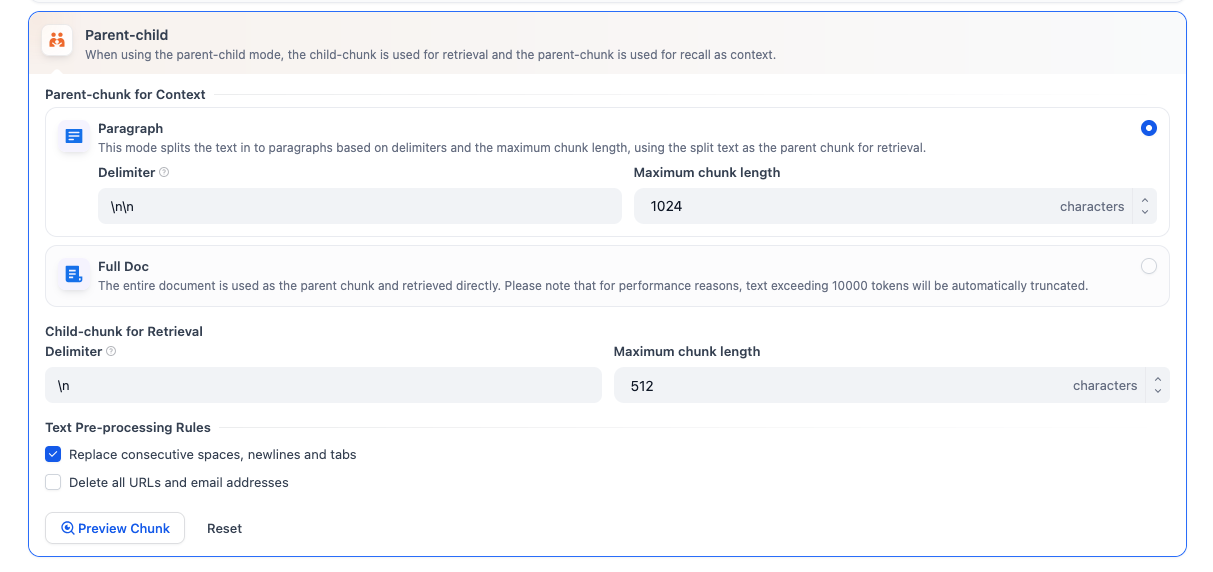
🎯 Chunk design. Small chunks match precise questions; large chunks keep context together. Re-ingest a copy of the knowledge base with a different chunk size and compare the test_related answers.
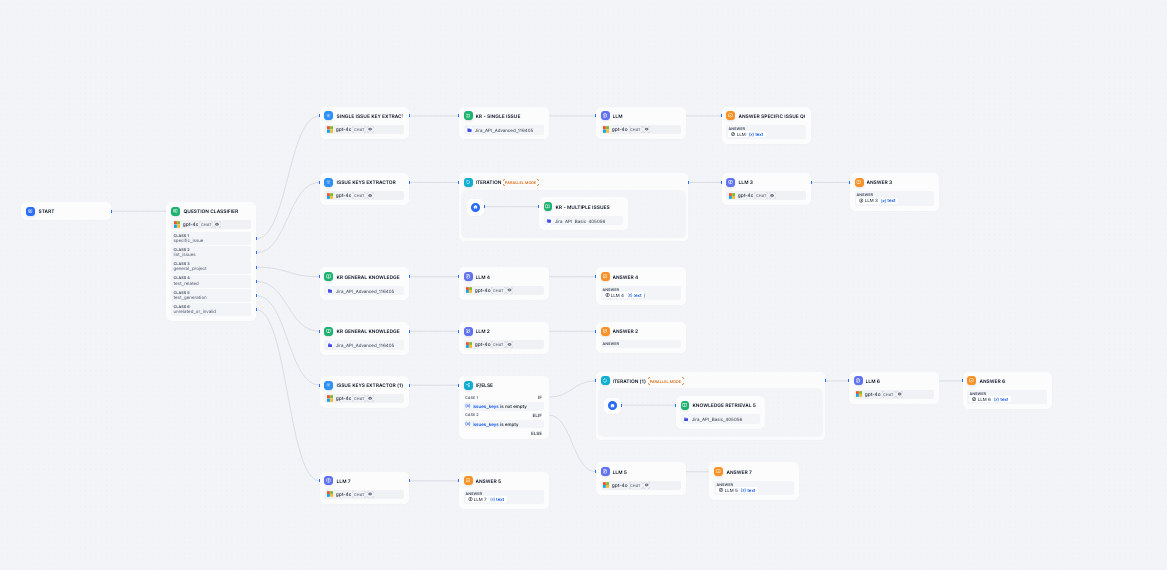
🪜 Parent-child retrieval. Sometimes the answer needs a whole group: an epic and its stories, or a test suite and its cases. Store the parent in metadata (for example epic_id), retrieve one item, then retrieve its siblings by filtering on that parent.

🧠 More classes. Add a class such as issue_status ("Which issues are still open?") and route it to a retriever filtered on status metadata.
🗂️ Solution Download
⬇️ Download Exercise 4 Solution DSL
Import it with Studio → Import DSL file. The file refers to a knowledge base on the instance it was exported from, so reselect Jira_API_Advanced_* in these five nodes before running it: KR - Single Issue, KR - Each Issue, KR - General Project, KR - Test Related and KR - Issue for Tests. Then check that the three filtered retrievers (KR - Single Issue, KR - Each Issue, KR - Issue for Tests) still show Conditions 1 under Metadata Filtering.
🌟 Wrap-up
Your assistant now picks the right retrieval strategy for each question. It looks up exact issues by key, handles several issues without mixing them up, reports what it couldn't find, writes Gherkin tests from issues or requirements, and stays in scope. Keep experimenting, and use the acceptance table to check that every change still passes.